Windows 10 has many tips and tricks that are quite useful.This features are very helpful for both beginners and professionals.
For this you must have the latest version of window 10. Some tricks will work on older version also.
Here are some of the best tips and tricks of windows 10 you should know.
For this you must have the latest version of window 10. Some tricks will work on older version also.
Here are some of the best tips and tricks of windows 10 you should know.
1. OPEN PINNED PROGRAMS
You can open your taskbar pinned programs by pressing (window+number).The numbers start from left .
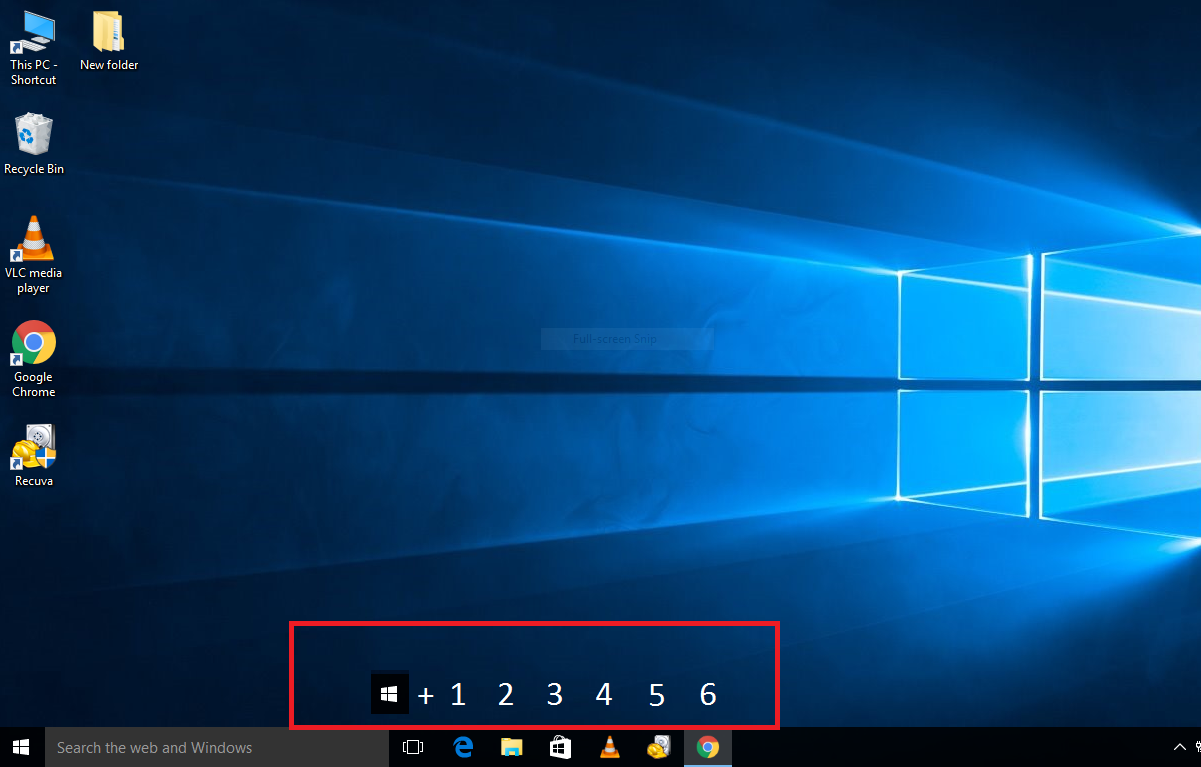 |
| PINNED PROGRAMS |
2. DICTATION
With the help of this you can write in any text field (note pad,etc) just by dictating to it.To activate just press (window +H) while using any text field.
 |
| NOTE PAD DICTATION |
3. CALCULATOR
This calculator has new features from the previous one. Just open your calculator and see on the upper left side menu you have new features like scientific,programmer and date calculation.
 |
| WINDOWS 10 CALCULATOR |
4. SLIDE TO SHUTDOWN
Right click on your dekstop then NEW after that click on SHORTCUT. copy and paste the below line in the shortcut location.
%windir%\System32\SlideToShutDown.exe
Click on next and finish then click on the created icon.From here when you slide down the screen it will shutdown automatically.
5. CALCULATE TIME DIFFERENCE
Search "ALARM AND CLOCK" on the left bottom of your windows screen. click on world clock, now click on the (+) on right down side and enter the name of the place whose time and date you want to know.
This helps you to know the time difference between different places
6. CMD ( COPY & PASTE )
As we know we cannot use copy paste in CMD (command prompt). To enable this search CMD in the search bar and select it.
Now click on the task bar and select PROPERTY .Here click the box near to "Enable ctr key shortcut" and press ok.
Now you can use copy and paste in CMD.
7. AERO-SHAKE
This is an old trick but very useful. It helps to minimize several windows simultaneously except the one you are working on.
Left click on the title bar of the window now with the left mouse button held down shake back and forth (left to right). This will minimize all the windows except the one you are working on.
To get them back just shake your mouse again.
8. TAKE A SCREEN SHOOT
9. JUMP LIST
This shows the recent task you have done on your pinned programs.
To see it just right click on the pinned program and you will get a list of your recent work. select the task you want to work on.
10.VIEW RELIABILITY HISTORY
It helps to solve trouble shooting issues.
Go to your search bar and type RELIABILITY and select "view reliability history".
This will show a graph of errors occurred every day.Select any error and it will show you the list of critical events and warnings.To solve the issue click on "view technical".It will provide you the description of your issue so you can solve it.
11. EMOJI MENU
To enable this just press (windows key + .) and there you go. (. This is known as period key and this is second right button to M in your key board
12. OLD START MENU
When we left click on the windows icon we get the new start menu.
If you like the old start menu just right click on the windows icon and you will see the old start menu.
So this are some of the best tips and tricks of windows 10. If you have any questions with this tricks please comment in the comment section below.
Right click on your dekstop then NEW after that click on SHORTCUT. copy and paste the below line in the shortcut location.
%windir%\System32\SlideToShutDown.exe
Click on next and finish then click on the created icon.From here when you slide down the screen it will shutdown automatically.
 |
| SLIDE TO SHUT DOWN SHORTCUT |
5. CALCULATE TIME DIFFERENCE
Search "ALARM AND CLOCK" on the left bottom of your windows screen. click on world clock, now click on the (+) on right down side and enter the name of the place whose time and date you want to know.
 |
| ALARM AND CLOCK |
This helps you to know the time difference between different places
6. CMD ( COPY & PASTE )
As we know we cannot use copy paste in CMD (command prompt). To enable this search CMD in the search bar and select it.
Now click on the task bar and select PROPERTY .Here click the box near to "Enable ctr key shortcut" and press ok.
Now you can use copy and paste in CMD.
 |
| COMMAND PROMPT |
7. AERO-SHAKE
This is an old trick but very useful. It helps to minimize several windows simultaneously except the one you are working on.
Left click on the title bar of the window now with the left mouse button held down shake back and forth (left to right). This will minimize all the windows except the one you are working on.
To get them back just shake your mouse again.
8. TAKE A SCREEN SHOOT
Many of us know that we have a ''prt sc '' button in our key board. To take a screen shoot of the screen we press (windows + prt sc) but it does not give a good picture.
Window 10 has a new feature to take screen shoot. To do that just press (window +shift+s) and select your shape you will get a good quality pic and you have other options to edit it .
 |
| SNIP AND SKETCH |
9. JUMP LIST
This shows the recent task you have done on your pinned programs.
To see it just right click on the pinned program and you will get a list of your recent work. select the task you want to work on.
 |
| JUMP LIST |
10.VIEW RELIABILITY HISTORY
It helps to solve trouble shooting issues.
Go to your search bar and type RELIABILITY and select "view reliability history".
This will show a graph of errors occurred every day.Select any error and it will show you the list of critical events and warnings.To solve the issue click on "view technical".It will provide you the description of your issue so you can solve it.
 |
| RELIABILITY ISSUE |
11. EMOJI MENU
To enable this just press (windows key + .) and there you go. (. This is known as period key and this is second right button to M in your key board
 |
| WINDOWS 10 IMOJI |
12. OLD START MENU
When we left click on the windows icon we get the new start menu.
If you like the old start menu just right click on the windows icon and you will see the old start menu.
 |
| OLD START MENU |
So this are some of the best tips and tricks of windows 10. If you have any questions with this tricks please comment in the comment section below.
Thanks so much to Donald Jackson for helping me hack into my husband phone so i could see what he is up to and i was able to catch him red handed, now i am out and a lot happier credit goes to earlier mention hacker for a good job. If you are also interested in any hack job you can contact him via his mail –
ReplyDeletedonarldjacksoncyberhost@gmail.com
WhatsApp, call or text +1425-341-3318
Tell him Rebecca refer you
Big thanks to Donald for helping and saving my marriage.. I had no idea the woman i married had kids
ReplyDeleteoutside. I am so depressed right now but I’m glad i found out this as soon as possible. all thanks to Donald
once again for good job done contact him if you need help to know the truth in your marriage
his WhatsApp +1425-341-3318 and his mail donarldjacksoncyberhost@gmail.com
Thanks so much to Donald Jackson for helping me hack into my husband phone so i could see what he is up to and i was able to catch him red handed, now i am out and a lot happier credit goes to earlier mention hacker for a good job. If you are also interested in any hack job you can contact him via his mail – (donarldjacksoncyberhost@ gmail, com) WhatsApp, call or text 1(425)341-3318 Tell him Rebecca refer you...
ReplyDelete